How To Build 1:1 ABM Landing Pages with AI Agents

Optimizely works with thousands of companies. Giving each target account its own 1:1 page would take a team of ABM managers, so Michiel, who runs Optimizely’s website, built an agent to do the job instead. It figures out what each account cares about, decides what belongs on the page, and hands sales a warm lead the moment someone clicks.
His approach is worth stealing, especially if you’re one of the three quarters of marketers who told us they don’t know where to start with agents. He doesn’t just give the agent instructions. He explains why the work matters and what a good page should include. Here’s how it works.
The research: every account gets a profile built from key data sources
The agent works off Optimizely’s ICP database in Salesforce. Michiel even built a search engine so the team can find any of the 2,600 accounts. For each one, the agent pulls from:
- Salesforce and 6sense
- BuiltWith and LinkedIn
- Call transcripts
- Company website
As Michiel pointed out, companies publish what they’re investing in and the roles they’re hiring for on their own site – key inputs to weave into the custom pitch.
The goal is to learn more than who a company is. The agent also figures out what the account cares about and how they talk, then turns that research into the messaging for its page.
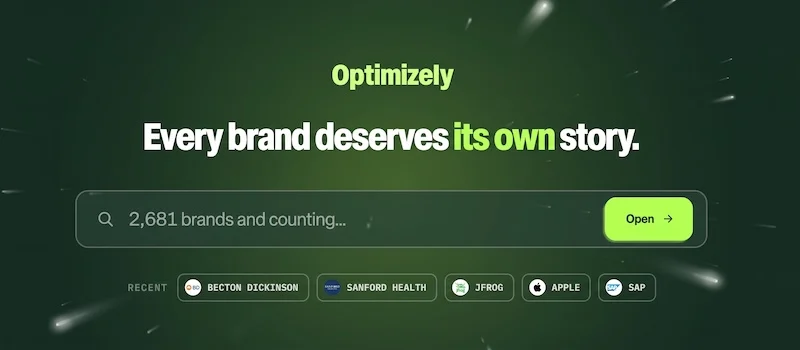
The page: Tailor each account’s language for a custom pitch
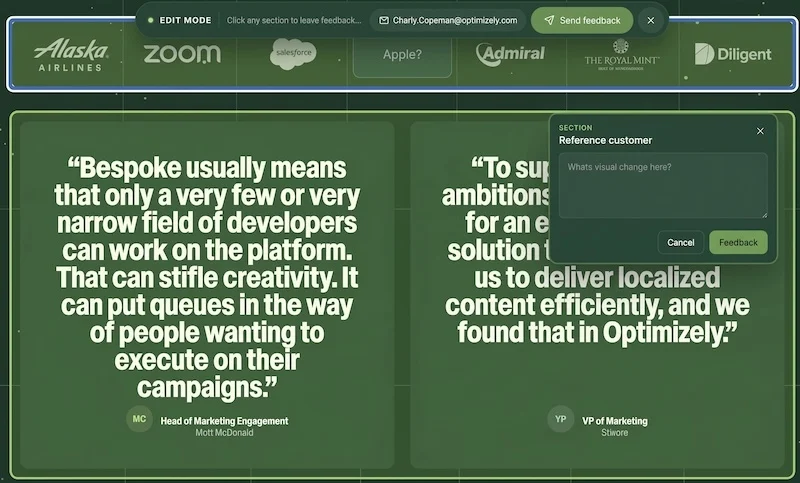
A good ABM page isn’t a hub page with everything on it – it only includes the content that speaks to that account’s priorities. The agent writes a net-new pitch from pre-approved phrases and Optimizely’s own CMS content, so every page is custom and on-message. Each one also includes a screenshot of the company’s site and its brand accent colors.
Because this is outbound, there’s no form on the page as the team already knows who they’re reaching out to. When a visitor clicks the CTA, the page sets off a laser animation and the agent pings the internal account owner to book a meeting right away.
The team gets two more tools behind the scenes. An x-ray mode shows exactly where each piece of the page’s data came from, and an edit mode lets anyone internal, including reps, request changes while the agent makes the edits in the background. Reps can even build their own pages live on a call.
The engine: give the agent the why so it can run without you
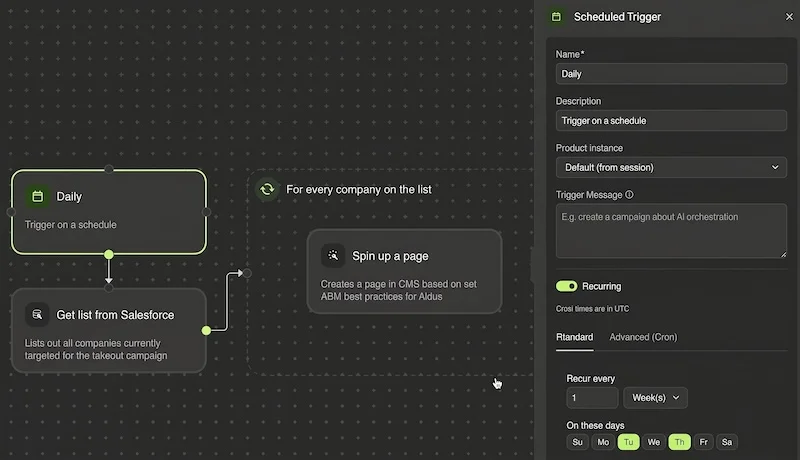
The agent runs as one workflow in the role of an ABM manager. Because it’s told why the work matters, it knows what a good page needs, not just the steps to build one. Michiel says that’s what keeps it repeatable across thousands of accounts.
The full process:
- Every Tuesday and Thursday, when most CRM updates happen, the agent pulls the account list from Salesforce.
- For every company on the list, it does the research by browsing the web, running searches, and taking screenshots.
- It builds the landing page in the CMS and stores the files in the digital asset manager.
- It sends the sales team a message with instructions on how to activate the page.
- Every week, it refreshes the 100 oldest pages. When an account moves through the deal cycle or the opportunity closes, it updates the page or moves it out.
Michiel’s key learnings:
- Manage the system, not the pages. With thousands of pages live, he can’t review each one. Instead, he tracks how people engage with the pages and checks quality from a central dashboard. When the agent goes off the rails, he coaches it to stop and do it the way he wants.
- Your agent is only as good as your CRM. Across more than 14,000 runs, Michiel’s agent failed only about 120 times, and about 9/10 of those failures came from someone not updating Salesforce or data that needed cleanup.
- Use it in person, not just outbound. At events, the team loads the event’s lead list into the agent. That way, when they meet an attendee, they can pull up that person’s company page and show it to them on the spot.
Where to start: build one great page so your agent has a model
2,600 custom pages is a lot. But what makes Michiel’s agent work isn’t volume. It’s a clear brief: who the account is, what they care about, and why the page matters. So start with one account and one page.
Pick one target account and pull everything you already have on it: the CRM record, intent data on what they’re researching, tech stack, LinkedIn, and transcripts. Then read their website and job postings to hear how they describe their priorities. From there, write a net-new pitch using your team’s approved messaging and content that speaks to those priorities. Once you have a page you’d send, have AI analyze why it works and hand that brief to your agent to replicate.
This isn’t a beginner’s agent. The best way to learn it is from Michiel himself, so watch the full Exit Five Live session: How I Built That Agent – 7 Marketers Show AI Workflows That Save Hours